Claude Code用几台闲置设备,40cm内定位到那个低电的二氧化碳探测器
问题:储物间里间歇的哔声
我们家有个储物间,里面全是搬家后还没拆的箱子。几周前,那个房间里有东西开始间歇性地哔哔叫。哔声间隔太长了,站在房间里想找出声源非常折磨人,而我又实在不想把每个箱子都翻一遍。于是我让 Claude Code 做了 Beep Locator——一套用散落在房间各处的多台设备来三角定位神秘哔声来源的软件系统。
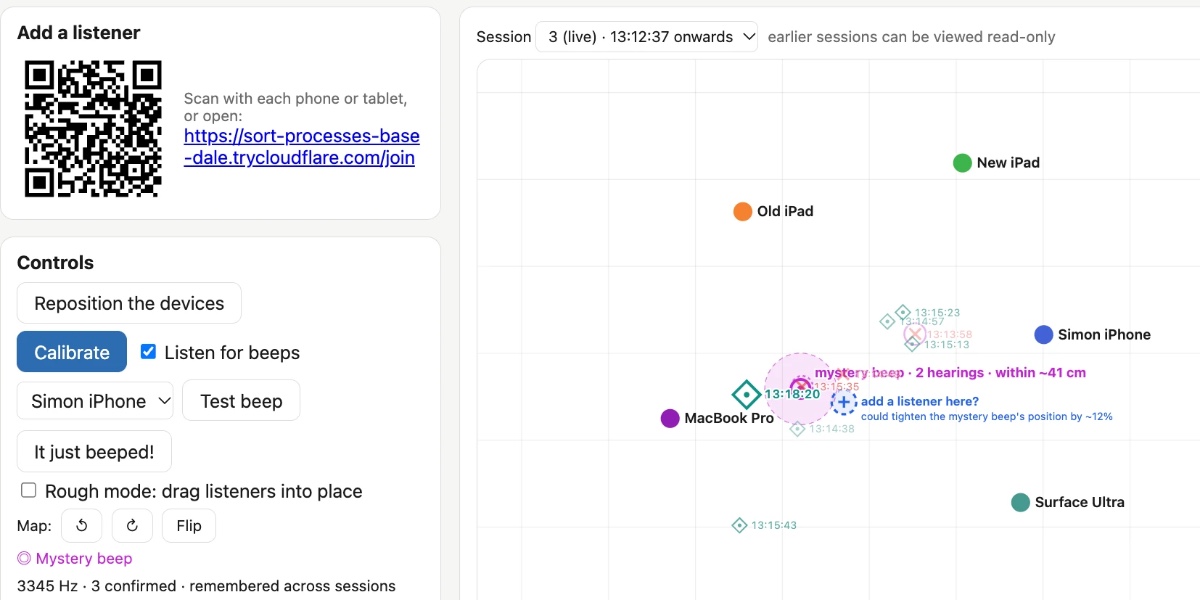
这是跑了一段时间之后的 Beep Locator:
你运行一个 Python Web 服务器来展示主界面,然后用二维码或 URL 把手上能腾出来的设备都接上作为监听器——我用的是两台 iPad、一部手机、一台 MacBook Pro 和一台 Surface Ultra。
设备之间会互相播放声音,帮助估算彼此的位置。这招效果不太好,所以我加了个"Rough mode“(粗略模式):你可以在空间里拖动设备图标,给出大致位置,系统再根据那些声音做修正。
布置好之后,所有设备就开始一起监听那个哔声!
我还加了个拍手模式,这样我可以在房间不同位置拍手来测试——拍手会在地图上显示成菱形。这让我对系统定位声音的能力有了信心。
哔声在地图上显示为 X,同时在”Sounds located“日志里记一行。你可以依次从每台设备回放这些声音,确认它们就是你要找的那个神秘哔声,然后点”This is the mystery beep"把它标记出来。
一旦你确认了神秘哔声的频率,系统就会专门盯着它听,测量哔声之间的间隔,再用三角定位结果锁定地图上最可能的位置。
系统按预期工作了。它把哔声位置定到了约 40cm 以内,然后我翻那一堆箱子,找到了一个老旧的二氧化碳探测器,它正拼命想让人给它换电池。
原理:BeepBeep 论文
我一开始和 Claude 处理这个问题时,它很快就挖出了 BeepBeep: A High-Accuracy Acoustic-Based System for Ranging and Localization Using COTS Devices,这是 Chunyi Peng、Guobin Shen、Yongguang Zhang、Yanlin Li 和 Kun Tan 在 2007 年发表的一篇论文。摘要如下:
> 我们介绍 BeepBeep 的设计、实现与评估——一个高精度的、基于声学的测距系统。它工作在自发的、自组织(ad-hoc)、设备到设备的场景中,不依赖任何预先规划的基础设施。它是纯软件方案,只用最基础的商用硬件——一个扬声器、一个麦克风,以及某种设备间通信方式——因此能方便地应用于许多低成本传感器平台,以及大多数商用现货(COTS,commercial-off-the-shelf)移动设备,比如手机和 PDA。它通过三项技术的组合实现高精度:双向感知(two-way sensing)、自录音(self-recording)和采样计数(sample counting)。
这听起来正是我们要做的东西!
Beep Locator 运行一个 Python Web 应用服务器,承担大部分工作。监听设备通过 WebSockets 连到服务器,并展示一个请求浏览器麦克风权限的界面。监听器主要靠录制最近 60 秒的音频缓冲来工作。它们还跑一个简单的哔声检测算法(见 detector.js),用 Fast Fourier Transform(快速傅里叶变换,FFT)和高通滤波器来识别可能的哔声,然后把这些事件发给主服务器。
当有哔声被上报,服务器会让某台设备——往返时延(round-trip time)最低的那台——播放一声短促的啁啾(chirp),然后要求每个监听器上传一段录音:从哔声前约 0.6 秒到啁啾后 0.8 秒。这个啁啾让各段录音能互相对齐,这是定位哔声的关键一步。
起步:先让 Claude 写一份 problem.md
我是用 iPhone 上的 Claude Code Cloud 开始这个项目的,用 Opus 5.5,跑在 Extra thinking effort 模式。下面是那个共享的起步会话,开头是对一个刚建好的空 GitHub 仓库输入这段提示词:
Write out a problem.md file describing the problem we want to solve
There is a device beeping in a room and I cannot find it
I want to set up several devices - laptops, phones, iPads - around the room all listening at the same time and have them help triangulate where the beep comes from
There needs to be a Python web app which coordinates it all - one device shows a web page for the app, other devices join a URL which turns them into listeners - all via browser WebAudio and WebSockets back to the Python server app
Ideally I wouldn't need to manually input the relative locations of the devices - it would be amazing if they could play sounds to each other in order to locate each other in 2D space - is that even possible though?
这样就得到了 problem.md。写这份文件的过程中,Claude 找到了并读了 BeepBeep 论文,那份文件里对此有描述。
调研看着靠谱,于是我说:
Ok try and build it, add a mechanism so you can send new code to the listeners which they will then run automatically - that way I can set everything up in the room and then leave you alone to continue hacking and experiment while I do something else
到这里大部分系统已经建好了,但还没有真正跑过一次。
我把新仓库克隆到笔记本上,启动了 Claude Code……然后 Fable 5.2 发布了,这个项目看起来正好是检验它的绝佳机会。
我让笔记本上的 Claude Code 把服务器跑起来,然后确保它既能看见正在发生什么,又能在软件运行时做实时修改。
这一点其实已经内置在软件里了:Opus 5.5 在监听器上实现了一个 installModule() 方法,可以通过 WebSocket 连接触发,也就是说管理端服务器能在任意客户端上执行任意新代码。
在某些设备上,监听麦克风的网页每次刷新都会重新请求用户授权。热替换模块的机制让我们部署新代码时不必挨个手动操作每台监听设备。
从那以后,我的参与方式主要就是坐在笔记本旁边,和 Fable 5.2 聊当前的情况,偶尔提一些新功能需求。下面是我用过的一些功能提示词:
I think we need to make it so I can drag things around on the map in "rough mode", where my job is just to put them roughly where they are, then switch out of rough mode and it attempts to get them accurate
这让我能在地图上拖动监听器。
what's a good way for me to test this I wonder? Can we have it listen for claps, then I could clap and it could identify the location of the clap? [...]
Claps should use a different symbol on the map than beeps
于是每次我拍手,地图上都会用一个和哔声不同的符号显示出来。
each symbol on the map should include a HH:MM:SS timestamp
这样更容易看出哪个符号对应现实中的哪次声音。
The log should show beeps and claps with their timestamps AND have a little play button which, when clicked, replays the recorded noise from each of the listeners in sequence (with clear text on screen showing which listener recorded which snippet) while temporarily turning off microphone recording while that replay plays
现在我可以回放声音了,判断哪段录音是神秘哔声容易多了。
There should be a button next to a recording for "This is the mystery beep" - then I can hit replay to see and then confirm it was the mystery beep if that's the one I am looking for
Then the system can categorize noises in the future to see if they are likely that same mysterious beep and use that information to build a more accurate idea of where it is
到这里已经很接近了——我对哔声的来源有了靠谱的判断,但要是能把监听器挪到那个点周围、再精确定位一次,岂不是更好?
I want a feature for this, I don't want to have to restart each listening device etc, I want to be able to click a "Reposition the devices" button which lets me switch into repositioning, then I click "Repositioned" and it puts me into Rough mode and asks me to roughly locate them, then I do that and click, then it starts up again. The previous session can be read-only viewed through the app.
另外我还有一台闲置设备,于是我说:
add a feature where the map includes a spot that is a suggestion for a location that it would be useful to add a listener at - based on data collected so far
给 Claude Code 装上耳朵
我觉得这个项目最有意思的地方在于,它证明了可以给 Claude Code 装上耳朵。
Claude 没有原生音频输入(暂时还没有),但它能跑 JavaScript 和 Python 代码,去分析麦克风采集到的音频。
我让它跑一个 Web 服务器,用 WebSocket 连上多台监听设备,然后在这些设备上跑 WebAudio 麦克风,并把它们接好,好让它们能通过那条 WebSocket 收到新的 JavaScript 代码并执行。
之后我基本可以把 Claude 放在一边,让它自己啃这个问题、查询音频日志、重新配置自己的耳朵来帮忙。
这让我想起几周前在 GitHub Universe 听到的一个类似招数:Martin Woodward 告诉我,他调试 GitHub Universe 徽章计算机的办法是用 USB-C 把它们接到电脑上,再用摄像头对着它们的屏幕,这样他的编码 agent 就能判断更新是否生效了。
想办法让编码 agent 感知周围的世界,实在很有乐趣。